TL;DR
Mobile AI adoption isn't won inside the app. It's won on the lock screen,
home screen, share sheet, shortcuts, widgets, and system surfaces people
touch dozens of times a day.
I led key design initiatives across OS-level integrations, helping
transform Copilot from a destination users open into a companion that's
available whenever they need it. That spanned platform-native experiences
across widgets, OS shortcuts, Android and iOS integrations, and the
convergence of previously fragmented platform experiences into a unified
Copilot ecosystem.
The story
As Copilot Mobile matured, one thing became clear: asking users to
constantly launch an app creates friction. The fastest experience is
often the one that never requires opening the app at all.
At the same time, iOS and Android kept investing heavily in the platform
surfaces that had become primary engagement channels: widgets, lock screen
experiences, Siri and OS shortcuts, Android home-screen surfaces, deep
links, quick actions, and other platform-specific entry points.
The opportunity wasn't to build another feature. It was to make Copilot
feel like a native part of the operating system. That meant rethinking how
AI could live across the surfaces users already interact with throughout
the day.
Why this mattered
Most AI products focus on making conversations better. Mobile platforms
reward making conversations easier to start. Cutting even a few seconds of
friction can meaningfully change engagement, especially on mobile where
interactions are brief, opportunistic, and highly contextual.
The challenge was that every OS surface came with different constraints,
behaviours, and technical limits. We needed a strategy that felt native to
each platform while still feeling unmistakably Copilot.
The bet paid off. OS integrations are now a meaningful engagement driver
for Copilot Mobile, reaching roughly a quarter of active users and
contributing around 14% of all weekly conversations. File
open, shortcuts, widgets, and CarPlay together show that meeting people on
the surfaces they already use materially increases how often they reach for
Copilot.
What we learned
Users don't think about operating systems. They think about getting
something done. When people want help, they don't care whether they're
inside a widget, a shortcut, a home-screen surface, or the app itself. They
expect Copilot to be immediately available.
That shifted our thinking away from feature parity and toward
accessibility, discoverability, and speed. The question became:
How do we bring Copilot closer to the moment of intent?
The turning point
Instead of treating widgets, shortcuts, and OS integrations as independent
efforts, we started viewing them as parts of a single ecosystem. That
created an opportunity to align entry points, visual language, interaction
patterns, platform behaviours, and cross-platform consistency, while still
respecting the unique strengths of iOS and Android.
The result was a more unified vision for how Copilot exists across mobile
operating systems.
Design principles
Copilot should always be one tap away
The best AI experience is the one users can access immediately.
Native beats transplanted
Every surface should feel designed for the platform, not copied from the app.
Consistency builds trust
Users should recognise Copilot wherever they encounter it.
Speed matters more than depth
OS surfaces should optimise for starting experiences, not recreating the entire product.
Design decisions
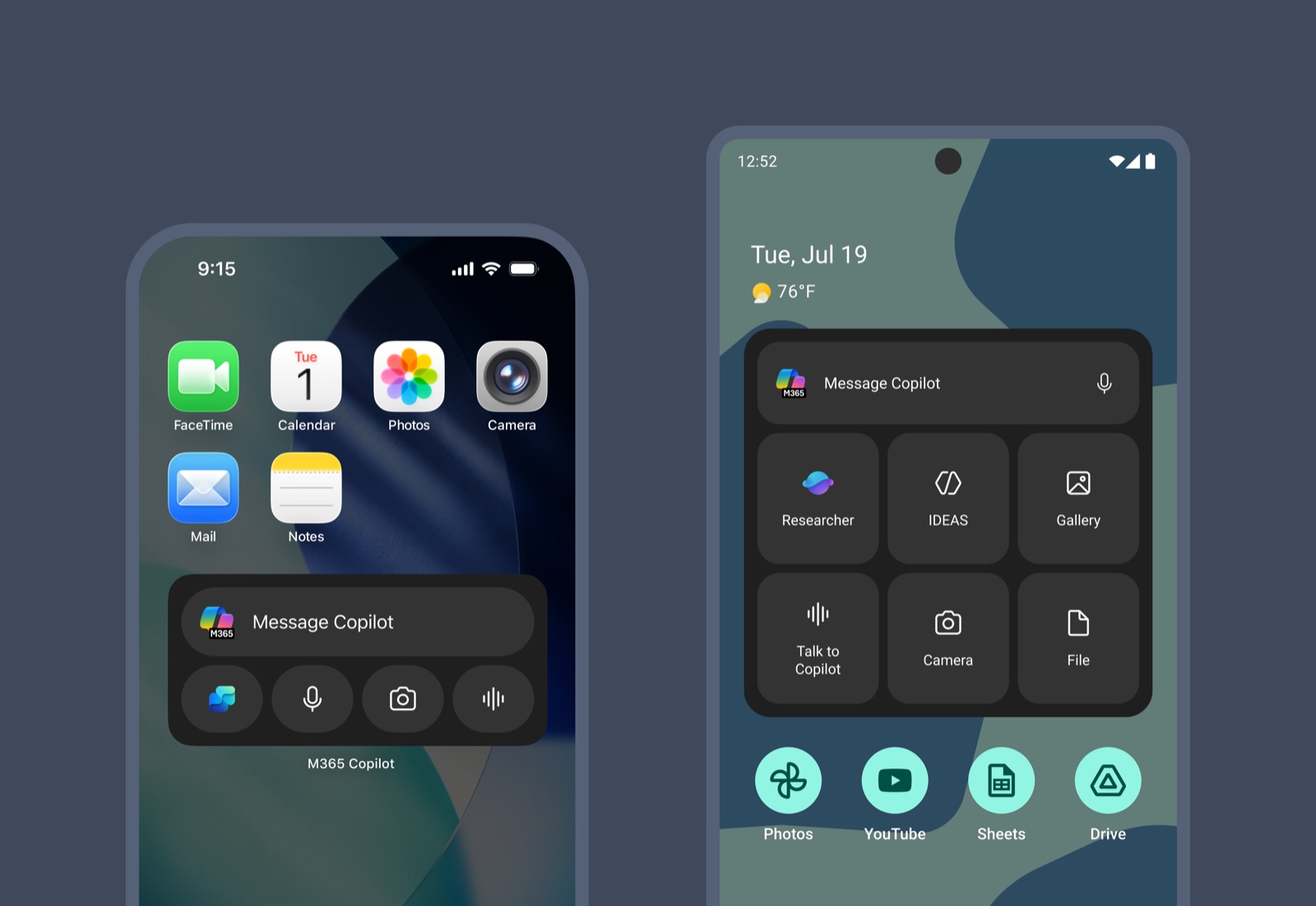
Opened Copilot up across the OS
We designed native entry points that meet people where they already are:
home-screen widgets, the lock screen, Control Center, Siri, system
shortcuts, and tiles. Each one is a fast, contextual way to start with
Copilot without first opening the app.
Reimagined widgets as active Copilot surfaces
Rather than static shortcuts, widgets became intelligent entry points that
help users quickly start conversations, capture ideas, and return to
ongoing work. This included a home-screen widget for enterprise users, with
unified eligibility and telemetry across both platforms.
Made identity feel seamless
Personal and work accounts each carry their own theming, and we designed
switch-account flows so people can move between them without friction,
across every surface.
Designed the upgrade moments
Partnered on the monetisation surfaces, upgrade screens and a promotional
nudge, so growth moments feel native to the OS experience rather than
bolted on.
Unified platform experiences
Worked across platform teams to drive convergence between iOS and Android
while preserving platform-native behaviours, bringing Android to parity on
dictate widget and shortcut, voice, and new widget experiences.
Designed for ecosystem growth
Created patterns that can scale to future OS integrations, rather than
solving only for individual surfaces.
Building to learn
OS integrations are difficult to validate in traditional design reviews.
Many of the critical questions only emerge when experiences live on real
devices. Do users discover them? Do they return? Does it feel native? Does
it replace existing habits? Does it create incremental engagement?
Answering those required close collaboration with engineering, PM, and
platform teams, along with repeated iteration against platform constraints
and implementation realities.
Outcomes
The workstream shipped on track, fully code complete, and rolled out to
Insiders across both platforms. It established a foundation for Copilot's
presence beyond the app itself: native OS entry points for personal
accounts across widgets, lock screen, Control Center, Siri, shortcuts, and
tiles; an enterprise home-screen widget with unified eligibility and
telemetry; account theming and switch-account flows; and monetisation
surfaces designed into the OS experience.
On the quality side, external actions on iOS became roughly 650ms faster,
and a dogfood bug bash hardened the experience before wider release.
Android reached parity on the dictate widget and shortcut, voice, and a new
widget. The direct file-open experience earned around 80%
thumbs-up satisfaction, a strong signal that these native entry points feel
genuinely useful and not just convenient. Most importantly, the work moved
Copilot closer to becoming a persistent companion rather than just another
application.
Looking back
One of the biggest lessons was that platform integration isn't a feature
area. It's a distribution strategy. The more seamlessly Copilot fits into
people's existing workflows, the less they think about launching an AI app,
and the more they simply use AI.
What's next
The experience is already available for teams to try in early channels,
with an accessibility test pass in progress to make sure every surface is
usable by everyone. From there, the roadmap widens the rollout of the
enterprise widget and promotional surfaces worldwide, and extends the iOS
external-action performance work to enterprise users globally.
The future of mobile AI isn't confined to app boundaries. As operating
systems keep evolving around intelligence, voice, proactive experiences,
and contextual assistance, the opportunity is to make Copilot increasingly
ambient, accessible, and deeply integrated into the moments that matter.
Copilot should feel like part of the operating system, not an app running
on top of it.